
Skia AI is the imaging model inside DocsDocs. Caries scored tooth-by-tooth, interproximal and recurrent lesions caught, bone loss measured to the CEJ, calculus mapped — annotated in color the patient understands, attached to the chart, ready for the claim.
Targeting FDA 510(k) clearance Q4 2026. Not yet cleared; today Skia assists the clinician — it does not diagnose.
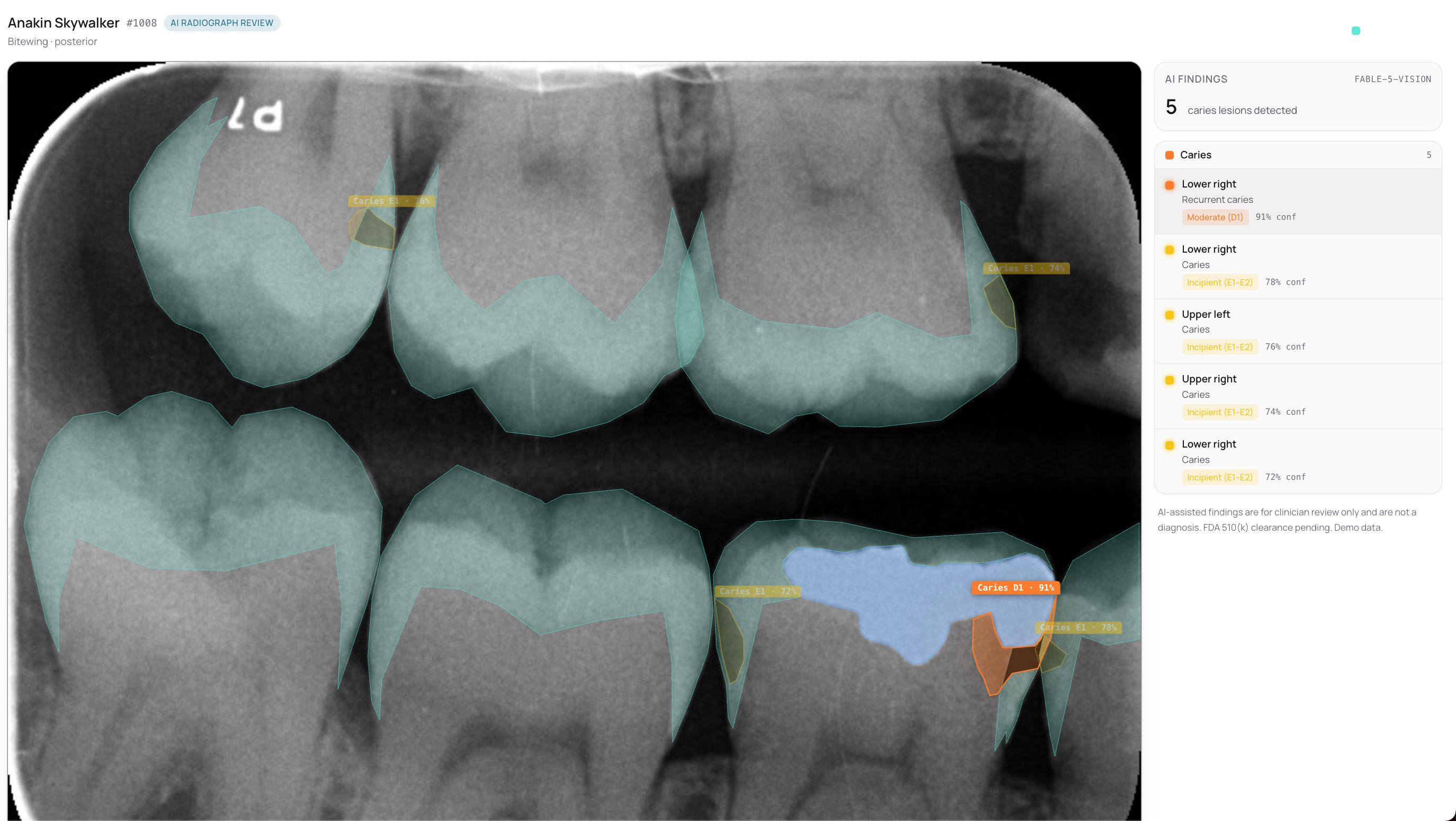
Interproximal, recurrent, and incipient lesions surface on the film before the eye drifts past them — each scored enamel to dentin to pulp, with the share of the tooth affected.
No end-of-day fatigue, no drift between associates. Skia holds one calibrated threshold from the first scan of the morning to the last of the night — a second set of eyes that never tires.
The same finding, in plain color on the patient's own tooth. When people see the decay instead of being told about it, the case explains itself.
A flagged finding becomes the attachment the claim needs, with the narrative already drafted. The read flows straight into the chart and the ledger — no exports, no second app.
Skia reads periapicals and bitewings for early decay, bone loss, and calculus — and shows the evidence behind every flag. It is a clinical assistant: the dentist accepts or dismisses each finding, and the chart never changes on its own.
READSkia rides on the imaging hardware a practice already owns and fits the way each kind of office works — from a single chair to a hundred.

The sensor fires and the read is already there — no upload, no second screen, no “send it to the cloud and wait.” Findings surface the instant a scan opens, scored and ready for review.
Every finding attaches to the tooth in the record — not a separate vendor app. Accept one and it becomes the claim’s attachment with the narrative drafted, ready to send.
Skia lines this year’s film up with last year’s so the same tooth sits in the same place — then follows how a lesion shifts between visits and puts a number on it. Progression, not a snapshot.
Four steps, none of them new. The scan becomes a finding, a picture the patient understands, and a claim that files itself.
A cavity is starting on your back-left molar. Treating it now means a small filling — not a crown later.
Twenty minutes, a real film, a full read — caries, bone, calculus, all of it in color. See exactly what your patients would see.
Skia AI is in development and not yet FDA-cleared for diagnostic use. Findings shown are demo data, illustrative pending clinical validation.
The things practices want to know before switching — and how DocsDocs handles them.
Most practices are fully live in 2–4 weeks. A DocsDocs specialist runs the whole move on-site with you — we read your old system at the source, rebuild it in the cloud, and reconcile every record before go-live. No dark weekend, no re-keying.
Yes. Everything runs on HIPAA-aligned AWS infrastructure under a signed BAA, encrypted in transit and at rest, with access logging and continuous multi-region backup. It's a stronger posture than a server in a supply closet.
Modern practices run on the internet the way they run on electricity, and a simple LTE/5G failover keeps you online through most outages. Connectivity is far more reliable than a single on-site server that fails with no warning.
No. DocsDocs runs in the browser on the Mac, PC, tablet or phone you already have — no server to rack, no closet box to patch. Add a location, a chair or a provider without racking anything new.
Book a 20-minute demo on your real workflow, or send us a note and a real person on our team gets back to you — usually within one business day. Migration is free.